A hands-on tutorial for developers to build their first AI agent, covering architecture, tool use, memory systems, and deployment with Python code examples.
Contents
AI agents are no longer an experimental curiosity — they're becoming a foundational building block of modern software. From customer support systems that resolve tickets autonomously to coding assistants that write, test, and deploy code, agents represent a fundamental shift from tools that respond to tools that act.
If you've been building with LLMs but haven't yet made the leap to agents, this guide is for you. We'll walk through the core concepts, build a working agent from scratch in Python, and cover the architectural decisions that separate toy demos from production-ready systems.
What Exactly Is an AI Agent?
An AI agent is a system that uses a language model as its reasoning engine to accomplish goals by taking actions in the world. The critical distinction from a chatbot is autonomy: an agent doesn't just generate text — it decides what to do next, executes actions, observes results, and iterates until the task is complete.
Think of it this way:
- LLM: Given a prompt, produce a response
- Chatbot: Given a conversation, produce the next message
- Agent: Given a goal, figure out the steps and execute them
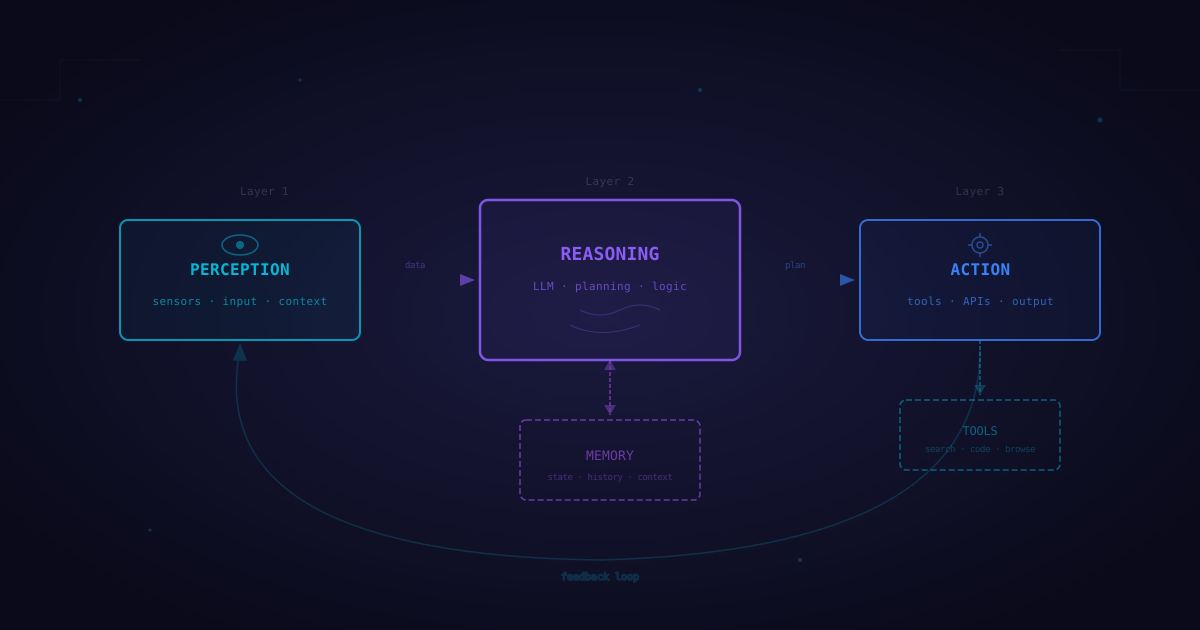
This distinction matters because agents introduce a loop. Instead of a single input→output pass, an agent operates in a cycle: perceive the current state, reason about what to do, take an action, observe the result, and repeat.
The Perception → Reasoning → Action Loop
Every AI agent, regardless of framework or implementation, follows the same fundamental architecture:
┌─────────────────────────────────────────┐
│              AGENT LOOP                 │
│                                         │
│   ┌──────────┐                          │
│   │ PERCEIVE │ ← Environment state,     │
│   └────┬─────┘   tool outputs,          │
│        │         user messages           │
│        ▼                                │
│   ┌──────────┐                          │
│   │  REASON  │ ← LLM processes context, │
│   └────┬─────┘   plans next step        │
│        │                                │
│        ▼                                │
│   ┌──────────┐                          │
│   │   ACT    │ → Call tools, send        │
│   └────┬─────┘   messages, update state  │
│        │                                │
│        └──────── Loop until done ───────┘
│                                         │
└─────────────────────────────────────────┘
Perception is how the agent takes in information — user input, tool outputs, database queries, API responses, or sensor data. The agent needs to understand its current context before making decisions.
Reasoning is where the LLM shines. Given the accumulated context, the model decides what action to take next. This is where chain-of-thought prompting, planning strategies, and decision-making happen.
Action is the agent executing its decision — calling an API, running code, querying a database, or sending a message. The result of the action feeds back into perception, and the loop continues.
Core Components of an Agent
Before we start building, let's understand the components we need:
1. The Language Model (Brain)
The LLM serves as the reasoning engine. It interprets context, makes plans, and decides which tools to use. Model choice matters — you need a model that's strong at function calling and instruction following. GPT-4o, Claude, and Gemini are common choices.
2. Tools (Hands)
Tools are functions the agent can call to interact with the world. Without tools, an agent is just a chatbot with extra steps. Tools can be anything: web search, code execution, database queries, API calls, file operations, or even controlling physical devices.
3. Memory (Context)
Memory allows agents to maintain context across interactions. There are two types:
- Short-term memory: The conversation history and current task context, typically held in the LLM's context window
- Long-term memory: Persistent storage (vector databases, key-value stores) that survives across sessions
4. Planning and Orchestration (Executive Function)
How does the agent decide what to do? Simple agents use ReAct (Reason + Act) — think step by step, take an action, observe the result. More sophisticated agents use planning frameworks that break complex goals into subtasks.
Building Your First Agent: Step by Step
Let's build a research agent that can search the web, read articles, and compile summaries. We'll start from scratch to understand the fundamentals, then show how frameworks like LangChain simplify the process.
Step 1: Define Your Tools
First, we need to give our agent capabilities. Each tool is a function with a clear description that the LLM can understand:
import json
import httpx
from dataclasses import dataclass, field
from typing import Callable

@dataclass
class Tool:
    name: str
    description: str
    parameters: dict
    function: Callable

    def to_schema(self) -> dict:
        """Convert to OpenAI function calling format."""
        return {
            "type": "function",
            "function": {
                "name": self.name,
                "description": self.description,
                "parameters": self.parameters,
            }
        }

def web_search(query: str, num_results: int = 5) -> str:
    """Search the web and return results."""
    response = httpx.get(
        "https://api.search-provider.com/search",
        params={"q": query, "count": num_results},
        headers={"Authorization": f"Bearer {SEARCH_API_KEY}"}
    )
    results = response.json().get("results", [])
    return json.dumps([
        {"title": r["title"], "url": r["url"], "snippet": r["snippet"]}
        for r in results
    ], indent=2)

def read_webpage(url: str) -> str:
    """Fetch and extract the main content from a webpage."""
    response = httpx.get(url, follow_redirects=True, timeout=15)
    # In production, use a proper HTML-to-text library
    from bs4 import BeautifulSoup
    soup = BeautifulSoup(response.text, "html.parser")
    # Remove scripts, styles, nav elements
    for tag in soup(["script", "style", "nav", "footer", "header"]):
        tag.decompose()
    text = soup.get_text(separator="\n", strip=True)
    return text[:8000]  # Truncate to manage context length

def save_note(content: str, filename: str) -> str:
    """Save a research note to a file."""
    with open(f"research_notes/{filename}", "w") as f:
        f.write(content)
    return f"Note saved to research_notes/{filename}"

# Register tools
tools = [
    Tool(
        name="web_search",
        description="Search the web for information. Use this to find articles, data, and sources on any topic.",
        parameters={
            "type": "object",
            "properties": {
                "query": {"type": "string", "description": "The search query"},
                "num_results": {"type": "integer", "description": "Number of results to return", "default": 5}
            },
            "required": ["query"]
        },
        function=web_search
    ),
    Tool(
        name="read_webpage",
        description="Read the content of a webpage. Use this to get detailed information from a specific URL.",
        parameters={
            "type": "object",
            "properties": {
                "url": {"type": "string", "description": "The URL to read"}
            },
            "required": ["url"]
        },
        function=read_webpage
    ),
    Tool(
        name="save_note",
        description="Save a research note or summary to a file for later reference.",
        parameters={
            "type": "object",
            "properties": {
                "content": {"type": "string", "description": "The content to save"},
                "filename": {"type": "string", "description": "The filename (e.g., 'summary.md')"}
            },
            "required": ["content", "filename"]
        },
        function=save_note
    ),
]
Step 2: Build the Agent Loop
Now let's build the core agent loop — the cycle of reasoning and acting:
from openai import OpenAI

class Agent:
    def __init__(self, model: str = "gpt-4o", tools: list[Tool] = None, max_steps: int = 10):
        self.client = OpenAI()
        self.model = model
        self.tools = {t.name: t for t in (tools or [])}
        self.tool_schemas = [t.to_schema() for t in (tools or [])]
        self.max_steps = max_steps
        self.messages: list[dict] = []

    def set_system_prompt(self, prompt: str):
        """Set the agent's system instructions."""
        self.messages = [{"role": "system", "content": prompt}]

    def run(self, user_message: str) -> str:
        """Execute the agent loop until completion or max steps."""
        self.messages.append({"role": "user", "content": user_message})

        for step in range(self.max_steps):
            print(f"\n--- Step {step + 1} ---")

            # REASON: Ask the LLM what to do next
            response = self.client.chat.completions.create(
                model=self.model,
                messages=self.messages,
                tools=self.tool_schemas if self.tool_schemas else None,
            )

            message = response.choices[0].message
            self.messages.append(message.model_dump())

            # Check if the agent wants to use tools
            if not message.tool_calls:
                # No tool calls — the agent is done reasoning
                print(f"Agent response: {message.content[:200]}...")
                return message.content

            # ACT: Execute each tool call
            for tool_call in message.tool_calls:
                tool_name = tool_call.function.name
                arguments = json.loads(tool_call.function.arguments)

                print(f"Calling tool: {tool_name}({arguments})")

                # Execute the tool
                tool = self.tools.get(tool_name)
                if tool:
                    try:
                        result = tool.function(**arguments)
                    except Exception as e:
                        result = f"Error: {str(e)}"
                else:
                    result = f"Error: Unknown tool '{tool_name}'"

                # PERCEIVE: Feed the result back into context
                self.messages.append({
                    "role": "tool",
                    "tool_call_id": tool_call.id,
                    "content": str(result)
                })

        return "Max steps reached. Here's what I found so far: " + self.messages[-1].get("content", "")
Step 3: Configure and Run
Now let's put it all together with a system prompt that guides the agent's behavior:
agent = Agent(model="gpt-4o", tools=tools, max_steps=10)

agent.set_system_prompt("""You are a research assistant. Your job is to thoroughly
research topics and provide well-sourced summaries.

When given a research task:
1. Search for relevant information using web_search
2. Read the most promising articles using read_webpage
3. Synthesize your findings into a clear summary
4. Save your research notes using save_note

Always cite your sources. Be thorough but concise. If your initial search
doesn't yield good results, try different search queries.""")

# Run the agent
result = agent.run("Research the current state of quantum computing in 2026 and its implications for cryptography")
print(result)
When you run this, you'll see the agent reasoning through the task — searching, reading articles, and compiling a summary, all autonomously.
Adding Memory: Making Agents Remember
Our basic agent forgets everything between sessions. For many applications, you need persistent memory. Here's how to add a simple vector-based memory system:
import numpy as np
from datetime import datetime

class AgentMemory:
    def __init__(self, embedding_client):
        self.client = embedding_client
        self.memories: list[dict] = []

    def store(self, content: str, metadata: dict = None):
        """Store a memory with its embedding."""
        embedding = self._embed(content)
        self.memories.append({
            "content": content,
            "embedding": embedding,
            "metadata": metadata or {},
            "timestamp": datetime.now().isoformat()
        })

    def recall(self, query: str, top_k: int = 5) -> list[str]:
        """Retrieve the most relevant memories for a query."""
        if not self.memories:
            return []

        query_embedding = self._embed(query)
        scored = []
        for mem in self.memories:
            similarity = self._cosine_similarity(query_embedding, mem["embedding"])
            scored.append((similarity, mem["content"]))

        scored.sort(key=lambda x: x[0], reverse=True)
        return [content for _, content in scored[:top_k]]

    def _embed(self, text: str) -> list[float]:
        response = self.client.embeddings.create(
            model="text-embedding-3-small",
            input=text
        )
        return response.data[0].embedding

    def _cosine_similarity(self, a: list[float], b: list[float]) -> float:
        a, b = np.array(a), np.array(b)
        return np.dot(a, b) / (np.linalg.norm(a) * np.linalg.norm(b))
To integrate memory into the agent, inject relevant memories into the context before each reasoning step:
# Before the LLM call in the agent loop
relevant_memories = self.memory.recall(user_message, top_k=3)
if relevant_memories:
    memory_context = "\n".join(f"- {m}" for m in relevant_memories)
    self.messages.insert(1, {
        "role": "system",
        "content": f"Relevant context from previous sessions:\n{memory_context}"
    })
In production, you'd use a proper vector database like Pinecone, Weaviate, or ChromaDB instead of in-memory storage. These handle persistence, scaling, and efficient similarity search.
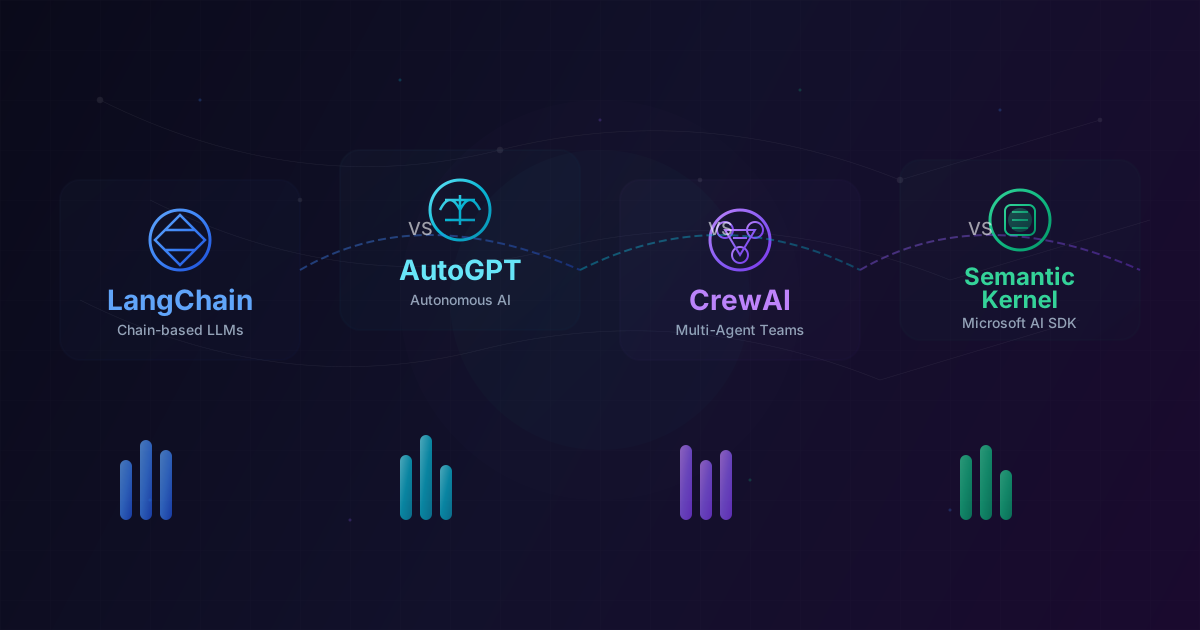
Using LangChain: Framework Approach
Building from scratch teaches you the fundamentals, but frameworks like LangChain handle boilerplate and provide battle-tested patterns. Here's the same research agent in LangChain:
from langchain_openai import ChatOpenAI
from langchain.agents import AgentExecutor, create_openai_tools_agent
from langchain_core.prompts import ChatPromptTemplate, MessagesPlaceholder
from langchain_community.tools import DuckDuckGoSearchRun
from langchain.tools import tool

# Define tools using LangChain's @tool decorator
@tool
def search_web(query: str) -> str:
    """Search the web for current information on any topic."""
    search = DuckDuckGoSearchRun()
    return search.run(query)

@tool
def save_research(content: str, topic: str) -> str:
    """Save research findings to a markdown file."""
    filename = topic.lower().replace(" ", "_") + ".md"
    with open(f"research/{filename}", "w") as f:
        f.write(f"# Research: {topic}\n\n{content}")
    return f"Saved to research/{filename}"

# Create the agent
llm = ChatOpenAI(model="gpt-4o", temperature=0)

prompt = ChatPromptTemplate.from_messages([
    ("system", "You are a thorough research assistant. Search for information, "
               "analyze multiple sources, and provide well-cited summaries."),
    MessagesPlaceholder(variable_name="chat_history", optional=True),
    ("human", "{input}"),
    MessagesPlaceholder(variable_name="agent_scratchpad"),
])

agent = create_openai_tools_agent(llm, [search_web, save_research], prompt)
executor = AgentExecutor(agent=agent, tools=[search_web, save_research], verbose=True)

# Run it
result = executor.invoke({
    "input": "Research the latest advances in AI agents and write a summary"
})
LangChain's AgentExecutor handles the loop, error recovery, and output parsing. The verbose=True flag lets you watch the agent's reasoning in real time.
Multi-Agent Systems with CrewAI
For complex tasks, a single agent isn't enough. CrewAI lets you define multiple specialized agents that collaborate:
from crewai import Agent, Task, Crew

researcher = Agent(
    role="Research Analyst",
    goal="Find comprehensive, accurate information on given topics",
    backstory="You are an experienced researcher with a knack for finding "
              "reliable sources and identifying key insights.",
    tools=[search_web, read_webpage],
    llm="gpt-4o"
)

writer = Agent(
    role="Technical Writer",
    goal="Transform research findings into clear, engaging content",
    backstory="You are a skilled technical writer who makes complex topics "
              "accessible without oversimplifying.",
    llm="gpt-4o"
)

research_task = Task(
    description="Research {topic} thoroughly. Find at least 5 reliable sources. "
                "Focus on recent developments, key players, and future trends.",
    expected_output="A detailed research brief with cited sources",
    agent=researcher
)

writing_task = Task(
    description="Using the research brief, write a comprehensive article. "
                "Include an introduction, key sections with headers, and a conclusion.",
    expected_output="A polished article of approximately 1500 words",
    agent=writer
)

crew = Crew(
    agents=[researcher, writer],
    tasks=[research_task, writing_task],
    verbose=True
)

result = crew.kickoff(inputs={"topic": "AI agents in production"})
The researcher gathers information, and the writer uses those findings to produce polished content. Each agent focuses on what it does best.
Production Deployment Tips
Building a working agent is one thing. Deploying it reliably is another. Here are the lessons that matter most:
Error Handling and Retries
Tools fail. APIs time out. LLMs hallucinate. Your agent needs graceful error handling at every level:
import tenacity

@tenacity.retry(
    stop=tenacity.stop_after_attempt(3),
    wait=tenacity.wait_exponential(multiplier=1, min=2, max=30),
    retry=tenacity.retry_if_exception_type((httpx.TimeoutException, httpx.HTTPStatusError))
)
def robust_tool_call(tool: Tool, **kwargs):
    """Execute a tool call with retry logic."""
    return tool.function(**kwargs)
Guardrails and Safety
Never let an agent take unrestricted actions. Implement guardrails:
- Input validation: Sanitize user inputs before passing to tools
- Output filtering: Check agent responses for sensitive information leakage
- Action limits: Cap the number of steps, API calls, or resources an agent can consume
- Human-in-the-loop: For high-stakes actions (sending emails, making purchases), require human approval
Observability
You can't debug what you can't see. Log every step of the agent loop:
- What the LLM was asked (full prompt)
- What it decided to do (tool calls and reasoning)
- What happened (tool results, errors)
- How long each step took
- Token usage and costs
Tools like LangSmith, Langfuse, or even structured logging to your existing observability stack make this manageable.
Cost Management
Agent loops can burn through tokens quickly. A runaway agent making dozens of tool calls with large context windows can cost dollars per interaction. Set hard limits:
class CostAwareAgent(Agent):
    def __init__(self, max_cost_usd: float = 0.50, **kwargs):
        super().__init__(**kwargs)
        self.max_cost = max_cost_usd
        self.total_tokens = 0

    def _check_budget(self, usage):
        self.total_tokens += usage.total_tokens
        estimated_cost = self.total_tokens * 0.000005  # Rough per-token cost
        if estimated_cost > self.max_cost:
            raise BudgetExceededError(
                f"Agent exceeded budget: ${estimated_cost:.4f} > ${self.max_cost}"
            )
Choosing the Right Architecture
Not every problem needs an agent. Use this decision framework:
| Approach | When to Use |
|---|---|
| Direct LLM call | Single-turn, well-defined tasks |
| Chain/Pipeline | Multi-step but predictable workflows |
| Single Agent | Dynamic tasks requiring tool use and iteration |
| Multi-Agent | Complex tasks needing specialization and collaboration |
Start simple. A well-designed chain often outperforms a poorly designed agent. Only reach for agents when you genuinely need the autonomy loop.
What's Next
You now have the building blocks to create AI agents — from the fundamental loop to production deployment. Here's where to go from here:
- Experiment with different models: Try Claude, GPT-4o, and open-source models like Llama to see how model choice affects agent behavior
- Build more complex tools: Connect your agent to databases, APIs, code execution environments, and external services
- Explore planning strategies: Look into tree-of-thought prompting, reflection, and self-critique patterns
- Study existing frameworks: Dive deeper into LangChain, CrewAI, and OpenAI's Assistants API
- Deploy and iterate: The best way to learn is to put an agent in front of real users and observe where it breaks
The age of AI agents is just beginning. The developers who master this paradigm now — who understand not just the APIs but the architectural patterns, failure modes, and design tradeoffs — will be the ones building the next generation of intelligent software.
Start small. Build something real. Iterate relentlessly.
🧠 Test Your Knowledge
3 questions about this article
Question 1 of 3
What are the three core components of an AI agent?
Question 2 of 3
What is the purpose of a tool in an AI agent?
Question 3 of 3
Why is memory important for AI agents?